> For the complete documentation index, see [llms.txt](https://eslam3kl.gitbook.io/blog/llms.txt). Markdown versions of documentation pages are available by appending `.md` to page URLs; this page is available as [Markdown](https://eslam3kl.gitbook.io/blog/hack-the-box-machines/hack-the-box-academy.md).
# Hack The Box — Academy
Hack The Box — Academy walkthrough
#### Hack The Box — Academy
Hey folks! Today we have a new EASY machine from **HackTheBox**. Let’s take a look at its info before we get started.
**What we will do ?**
As usual, we have some steps which we follow to **pwn** any machine, our steps are:
1. **Recon / Information gathering**
2. **Scanning**
3. **Gaining Access**
4. **Maintaining Access**
5. **Reporting / Analysis**
After finishing our steps we will have these informations, stay calm and follow reading :)
**1. Information Gathering**
In this step we aim to collect all these informations, which we can collect on a specific target like its open ports, security mode of login systems, directories, OS version, services versions, etc
We will start with `nmap` to check the upper requirements
`nmap -A -T4 10.10.10.215`
We have 2 open ports `22/80` so let’s check what we have on port `80`
Note that we have 2 functions `register/login` so we need to check them and know how they are working in the next step “scanning”, but at first let’s check the hidden directories using `gobuster`
`gobuster dir -u` [`http://10.10.10.215`](http://10.10.10.215/) `-w /path/to/wordlist -l`
We have `admin.php` which requires admin credentials to let you login to the admin portal
**2. Scanning**
In this step we aim to scan all collected info from the previous one.
We need to check:
1. Login function arguments/behavior
2. Register function arguments/behavior
After registering new user and used it to login
Unfortunately! I don’t have anything useful here! So let’s try to register the new user and intercept the request using `burpsuite`
Note that we have `roleid` parameter which have 2 values by default `0 > user priviliges` and `1 > admin priviliges`
So if I change it to `1` it will create an admin account, so create it and try to login to the admin portal
At the admin panel we have a domain `dev-staging-01.academy.htb.` Add it to the `/etc/hosts`
`echo "10.10.10.215 dev-staging-01.academy.htb" >> /etc/hosts`
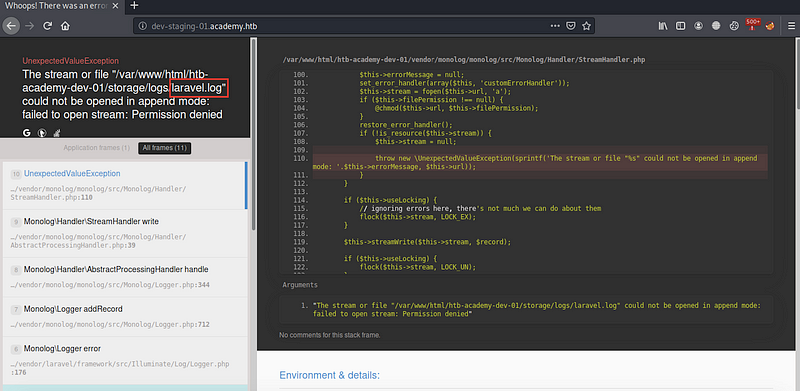
After opening the new domain…
We have `laravel_log` which contain sensitive data like `APP_KEY` and database `username` and `password`
After searching for `laravel log exploit github` I’ve found this `CVE-2018–15133 “RCE with API_KEY”`
**3. Gaining Access**
After checking its usage method, I tried to get a shell from it using the `APP_KEY`
For now, we have a shell, but with user `www-data` which have low privileges, so we need to scan all the machine to escalate our privileges or maintain our access
**4. Maintaining Access**
In this step we aim to find any information which may be leaked or not handled well to use to and get new privileges, so you can use `linpeas` or `linenum` or even check manually.
After checking the directory `/var/www/html/academy` by scan its hidden directories and files
`ls -la /var/www/html/academy`
We have `.env` file which contain a password
let’s try to use it with user `cry0l1t3` and it success! And we have the `user.txt`
Let’s try to escalate our privileges again with searching for the users log in `/var/log/audit` we have 4 files.
After searching for multiple words like `pass/root/mrb3n/su/tty` I’ve found this string with `TTY` process, so it seems that it’s password for a user, but I don’t know its type
So, After checking its type with `CyberChef` I’ve found that it’s `HEX`
The password is `mrb3n_Ac@d3my!.` for the user `mrb3n`
After checking the user permissions by `sudo -l`
I can execute `composer` command as `root` without asking me for a password
After searching for `composer priviliges escalations` I’ve found this great [resource](https://gtfobins.github.io/gtfobins/composer/)
And if you execute these 3 commands, it will get a root shell
```
TF=$(mktemp -d)
```
```
echo '{"scripts":{"x":"/bin/sh -i 0<&3 1>&3 2>&3"}}' >$TF/composer.json
```
```
sudo /usr/bin/composer --working-dir=$TF run-script x
```
If you speak Arabic, you can watch my walkthrough which I’ve explained all these steps from here